WATCH ONLINE

Watch Full Screen ›
B'nai Mitzvah Live Stream ›

SHABBAT SCHEDULE

FRIDAYS at 6:00 PM
SATURDAYS at 10:15 AM
 

Holiday Calendar

Upcoming Holiday

Wednesday, April 1 –
Wednesday, April 8
The story of Passover is about the search for freedom and faith made possible because of our strength and steady resilience. Every year at the seder table, we read in the Haggadah how we have the power to triumph over adversity. A testament to our faith, yes, as well as our responsibility to pass on our story l’dor v’dor, from generation to generation – to never forget that we survived plague and persecution through the millennia. Learn more at reformjudaism.org.

Why the Jewish Calendar Changes Every Year

People often say: “The Jewish holidays are late this year” or “The Jewish holidays are early this year.” In fact, the holidays never are early or late; they are always on time, according to the Jewish calendar. Unlike the Gregorian (civil) calendar, which is based on the sun (solar), the Jewish calendar is based primarily on the moon (lunar), with periodic adjustments made to account for the differences between the solar and lunar cycles.

Holiday Calendar

Jewish holidays begin at sunset. Dates specified are for evenings, so the holiday extends from sunset on the noted date until dusk on the last day of the holiday.

Selichot September 13, 2025
Rosh Hashanah September 22, 2025 – September 24, 2025
Yom Kippur October 1, 2025 – October 2, 2025
Sukkot October 6, 2025 – October 13, 2025
Sh’mini Atzeret and Simchat Torah October 13, 2025 – October 14, 2025
Chanukah December 14, 2025 – December 22, 2025
Tu BiSh’vat February 1, 2026 – February 2, 2026
Purim March 2, 2026 – March 3, 2026
Passover April 1, 2026 – April 8, 2026
Yom HaShoah April 13, 2026 – April 14, 2026
Yom HaZikaron and Yom HaAtzmaut April 20, 2026 – April 22, 2026
Lag BaOmer May 4, 2026 – May 5, 2026
Shavuot May 21, 2026 – May 22, 2026
Tishah B’Av July 22, 2026 – July 23, 2026
Selichot September 5, 2026
Rosh Hashanah September 11, 2026 – September 13, 2026
Yom Kippur September 20, 2026 – September 21, 2026
Sukkot September 25, 2026 – October 2, 2026
Sh’mini Atzeret and Simchat Torah October 2, 2026 – October 3, 2026
Chanukah December 4, 2026 – December 12, 2026
Tu BiSh’vat January 22, 2027 – January 23, 2027
Purim March 22, 2027 – March 23, 2027
Passover April 21, 2027 – April 28, 2027
Yom HaShoah May 3, 2027 – May 4, 2027
Yom HaZikaron and Yom HaAtzmaut May 10, 2027 – May 12, 2027
Lag BaOmer May 24, 2027 – May 25, 2027
Shavuot June 10, 2027 – June 11, 2027
Tishah B’Av August 11, 2027 – August 12, 2027
SelichotSeptember 25, 2027
Rosh HashanahOctober 1, 2027 – October 3, 2027
Yom KippurOctober 10, 2027 – October 11, 2027
SukkotOctober 15, 2027 – October 22, 2027
Shemini Atzeret and Simchat TorahOctober 22, 2027 – October 24, 2027
ChanukahDecember 24, 2027 – January 1, 2028
Tu BiSh’vatFebruary 11, 2028 – February 12, 2028
PurimMarch 11, 2028 – March 12, 2028
PassoverApril 10, 2028 – April 18, 2028
Yom HaShoahApril 23, 2028 – April 24, 2028
Yom HaZikaron & Yom HaAtzmautApril 30, 2028 – May 2, 2028
Lag BaOmerMay 13, 2028 – May 14, 2028
ShavuotMay 30, 2028 – June 1, 2028
Tishah B’AvJuly 31, 2028 – August 1, 2028

Annual Meeting 2025

2024 Meeting Minutes will be posted soon. Please check back again.

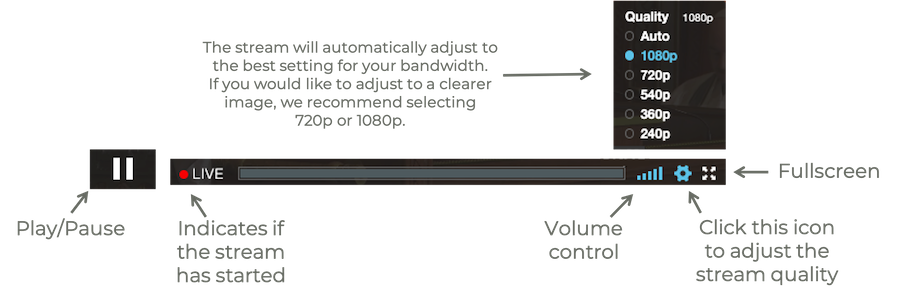
  1. Fast internet connections are ideal for viewing, such as cable, fiber, and FiOS. Live streaming will not work with dial-up, and if you have a slow internet speed, you may experience stuttering or screen freezing.
  2. If your screen freezes during viewing, please try reloading your browser. Also try clearing your history and shutting down other programs and web pages.
  3. Google Chrome and Firefox work well with our Live Stream, while Safari can be less dependable. If you are unable to view Live Stream at all, please try a different browser.
  4. If you cannot hear the Live Stream, make sure you click “Tap to Unmute” at the top of the player.
  5. Sound is largely a function of the quality of your audio equipment. External speakers will greatly enhance the sound.
  6. If you are having trouble dialing in to services (audio only):
    • Dial (929) 205-6099 on your phone.
    • It will then ask for the meeting or webinar ID—Enter meeting/webinar ID (947 9181 4318) followed by #.
    • It will then ask for participant ID, but you can skip that and wait for it to ask for the meeting passcode. When it does, enter the meeting passcode (676 263) followed by #.
    • Once you’ve entered that, you should be dialed in and able to hear services.